DJI Avata 360 Motion Fly More Combo

Regular price
$979.00
Sale price
$979.00
Regular price
$979.00
Shipping calculated at checkout.
BLACK FRIDAY

Limited Free Gifts | Nov 25-27

Buy DJI Avata 360 Fly More Combo (DJI RC 2), get DJI Avata 360 Propellers & DJI Avata 360 Replacement Lens for FREE. Gifts must be added to cart to qualify.

  • 1-Inch Flagship Imaging[1], 8K/60fps HDR Video [2]
  • O4+ Full HD Video Transmission
  • Integrated Propeller Guard, Create With Confidence
  • Omnidirectional Obstacle Sensing [3] for Dynamic Tracking Shots
  • Infinite Creativity From One Take [2]
  • Spotlight Free [2] for Instant Shareable Footage
  • FPV Flights & Aerial Filming in One Drone
  • 360° and Single Lens, Flexible Dual Modes [3]

Accessories

Accessories total: $0.00
Please note: Orders over $200 require a personal signature upon delivery.

Shopping Safely

At our Shopify store, we prioritize your safety and security. Here's how we ensure a secure shopping experience:

1. Secure Transactions: We use advanced encryption to protect your personal and payment information, ensuring it is safely transmitted and safeguarded.

2. Trusted Payment Gateways: Our store integrates with trusted payment gateways, ensuring your transactions are processed securely and efficiently.

3. Data Privacy: Your privacy is our top priority. We follow strict data protection policies to keep your personal information confidential and secure.

4. Secure Platform: Shopify provides robust security features and continuous monitoring against vulnerabilities, ensuring a safe shopping environment.

5. Verified Merchants: We are a verified merchant on Shopify, committed to providing authentic and high-quality products.

6. Transparent Policies: Our clear return, refund, and shipping policies provide peace of mind, knowing we stand behind our products.

7. Customer Support: Our dedicated customer support team is ready to assist with any concerns or questions you may have.

Shop confidently at our Shopify store, where your safety and satisfaction are our top priorities.

General Installment Payment Policies for Afterpay

·  Primary Products and Payment Structures 

Note:
 Eligibility, availability, and terms may vary by merchant, state, and individual user. The following represents commonly applicable general conditions.

1. Pay in 4 (Four Interest-Free Installments)

Payment Process:
 At checkout, the customer selects Afterpay and is required to pay the initial installment immediately (typically approximately 25% of the total purchase price, though this percentage may vary). The remaining three installments are automatically charged in fixed amounts every two weeks.

Interest:
 No interest is charged provided that payments are made on time.

Fees / Late Charges: Late payments may incur late fees; however, total late fees will not exceed 25% of the original order amount.

Eligible Merchants / Goods:
 Available at participating merchants; supported for online transactions.

2. Pay Monthly (Longer-Term Monthly Installments)

Purpose:
 Designed for higher-value purchases.

Structure:
 Upon approval, customers may select a monthly repayment schedule with terms extending up to 24 months.

Interest / Charges:
 This product constitutes a simple-interest loan; interest (APR) is charged. No origination fees or administrative fees apply, although late charges may be assessed for delinquent payments.

Credit Checks:
 May involve either a “soft” or “hard” credit inquiry depending on the merchant and transaction amount.

· Key Terms & Important Considerations

1.User Eligibility:
 Typically requires the customer to be at least 18 years of age, possess a valid U.S.-issued debit or credit card, and satisfy Afterpay’s underwriting, credit evaluation, and ability-to-pay assessment.

2.Authorization for Automatic Payments:
 The customer must authorize Afterpay to automatically debit the selected payment method (debit card, credit card, or eligible digital wallet).

3.Consequences of Late Payment: If payment is not received by the due date, a grace period of approximately 10 days is usually provided. After this period, late fees may be imposed. Continued non-payment may result in delinquency designations or account usage restrictions.

4.Early Repayment: Customers may prepay installments on both Pay in 4 and certain loan products without incurring prepayment penalties.

5.Refunds / Returns: For merchandise purchased using Afterpay, returns are subject to the merchant’s return policy. Customers remain responsible for outstanding installment obligations; however, merchant refunds will reduce the outstanding balance accordingly.

6.Payment Flexibility: Afterpay offers certain flexibility options, including installment rescheduling and voluntary early repayment.

· State / Merchant Restrictions & Additional Notes

1.Certain products (e.g., Pay Monthly) may not be available in all U.S. states due to regulatory restrictions.

2.Although Pay in 4 is interest-free, delinquency can result in account suspension or reduced spending limits for future transactions.

3.Even where services do not directly affect credit scores, late or missed payments may impact eligibility for future Afterpay usage.

Higher-value or long-term products such as Pay Monthly involve interest; customers should evaluate total borrowing costs before proceeding.

4.The final actual installment bill is subject to the amount shown on the checkout page.

Featured Summary

1-Inch-Class Imaging And 8K/60fps HDR

1/1.1-inch sensors[1] with large 2.4μm pixels and high dynamic range give a clear picture. 8K/60fps HDR 360° video[2] leaves enough resolution for sharp cropped shots.

Dynamic Camera Movement

Dynamic Mode (FPV Mode) tilts the camera with the aircraft as it banks and turns, for a stronger sense of speed and immersion in freestyle, omnidirectional tracking and manual flight. You can also add the same effect in post-production.

One Clip, Several Creations[2]

Record one 360° clip, then reframe it into several different videos afterward.

Unlimited Rotation And Tilt

360° imaging gives you endless rotation and tilt control. Fly in one direction while you rotate the horizon, flip the view or add a dolly zoom effect.

Moments By You

Smart Tracking

Pano Zoom

Infinite Tilt

Create Freely

What's Included

DJI Avata 360 X 1

DJI Avata 360 X 1

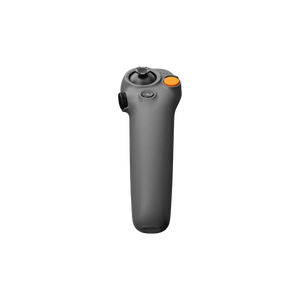
DJI RC Motion 3  × 1

DJI RC Motion 3 × 1

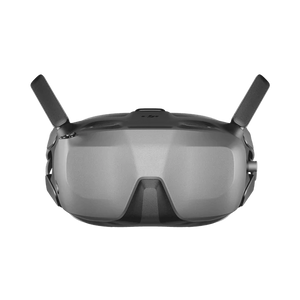
DJI Goggles N3  × 1

DJI Goggles N3 × 1

DJI Avata 360 Intelligent Flight Battery  x 3

DJI Avata 360 Intelligent Flight Battery x 3

DJI Avata 360 Charging Hub  × 1

DJI Avata 360 Charging Hub × 1

DJI Avata 360 Sling Bag  × 1

DJI Avata 360 Sling Bag × 1

DJI Avata 360 Gimbal Protector  × 1

DJI Avata 360 Gimbal Protector × 1

DJI Avata 360 Spare Propellers (Pair)  × 2

DJI Avata 360 Spare Propellers (Pair) × 2

Screwdriver  × 1

Screwdriver × 1

DJI Avata 360 Foldable Landing Pad  × 1

DJI Avata 360 Foldable Landing Pad × 1

DJI Avata 360 Lens Cleaning Cloth  × 1

DJI Avata 360 Lens Cleaning Cloth × 1

DJI RC Motion 3 Lanyard  × 1

DJI RC Motion 3 Lanyard × 1

USB-C to USB-C Data Cable  × 1

USB-C to USB-C Data Cable × 1

DJI Avata 360 Specifications and Compatibility

Specifications

Spec Details
Weight About 455 g (16.0 oz).
Size 246×199×55.5 mm (9.7×7.8×2.2 in) (L×W×H).
Flight and hover time About 23 minutes of flight and about 22 minutes of hover. Flight time was tested in a wind tunnel at sea level with no wind, flying forward at a constant 21.6 kph (13.4 mph) with Obstacle Avoidance Action set to Brake, in photo mode, until the battery ran out.
Flight distance Up to 13.5 km (8.4 mi), tested at a constant 39.6 kph (24.6 mph) under the same wind-tunnel conditions.
Speed and climb Horizontal: 6 m/s (13.4 mph) in Cine, 16 m/s (35.8 mph) in Normal (12 m/s by default, adjustable to 16 m/s in settings) and 18 m/s (40.3 mph) in Sport. Ascent: 2 m/s (4.5 mph) in Cine, 6 m/s (13.4 mph) in Normal, 10 m/s (22.4 mph) in Sport. Descent: 1.5 m/s (3.4 mph) in Cine, 6 m/s in Normal, 10 m/s in Sport.
Altitude and wind Takeoff altitude up to 4500 m (14,764 ft). Wind resistance 10.7 m/s (23.9 mph), Level 5. Maximum pitch angle 48°.
Operating temperature -10° to 40° C (14° to 104° F).
Positioning GPS, Galileo and BeiDou. Hovering accuracy: vertical ±0.1 m (±0.3 ft) with vision or ±0.5 m (±1.6 ft) with satellite; horizontal ±0.3 m (±1.0 ft) with vision or ±1.5 m (±4.9 ft) with satellite.
Storage 42 GB internal, plus a microSD slot. We don't include a card in the Drone Only, RC 2 or Fly More versions.
Camera Two 1/1.1-inch square CMOS sensors, each with 64MP effective pixels. Lens: 200° field of view, 7.8 mm equivalent (2.5 mm focal length), f/1.9, fixed focus from 1.5 m (4.9 ft) to infinity.
360° photos 30MP (8K) or 120MP (16K) single shots, up to 15520×7760, in JPEG or DNG (RAW).
Video 360° mode: 8K (7680×3840) and 6K (6000×3000) at up to 60 fps. Single-lens mode: 4K at up to 60 fps in 4:3 and 16:9, and 2.7K at up to 120 fps. 4K in 4:3 needs Goggles 3 or N3 with an RC Motion 3 or FPV Remote Controller 3. OSV/MP4 (H.265), Normal and D-Log M color modes, maximum bitrate 180 Mbps.
Stabilization In single-lens mode, RockSteady 3.0 with the RC 2, RC-N2 or RC-N3, and a switch between RockSteady 3.0 and HorizonBalancing with Goggles 3 or N3 and an RC Motion 3 or FPV Remote Controller 3.
Gimbal Single-axis mechanical gimbal (tilt), mechanical range -95° to 173°, plus a 360° virtual gimbal with tilt and roll from -180° to 180°. Controllable tilt: -30° to 60° with the RC 2, RC-N2 or RC-N3, and -60° to 60° with goggles and a motion controller.
Obstacle sensing Omnidirectional vision system, forward-facing LiDAR and a downward infrared sensor. Forward range 0.5-20 m (1.6 ft-66 ft); backward, lateral and upward ranges 0.5-18 m (1.6 ft-59 ft); downward range 0.5-20 m. Needs lighting above 1 lux.
Video transmission O4+ with 4 antennas. Up to 20 km (12.4 mi) one way under the FCC standard in open, interference-free conditions. Live view up to 1080p/60fps in 360° mode. Lowest latency about 130 ms with the RC 2, RC-N2 or RC-N3 at 1080p/60fps. Downloads up to 100 MB/s on Wi-Fi 6 and 10 MB/s on O4+.
Battery At least 2700 mAh and 38.67 Wh, about 149 g (5.3 oz).
Charging On the Charging Hub (100W max): about 47 minutes for one battery or about 100 minutes for three, from 0% to 100%. Through the aircraft (65W max): about 73 minutes for one battery. Tested at 25° C (77° F). The hub charges in parallel with the DJI 65W Portable Charger or the DJI 100W USB-C Power Adapter, and one after another otherwise.
Wi-Fi and Bluetooth Wi-Fi 802.11 a/b/g/n/ac/ax. Bluetooth 5.4.

Performance figures follow the manufacturer's published test conditions. Imperial values are our rounded conversions.

Compatibility

Item Included in Sold separately Notes
Intelligent Flight Battery (at least 2700 mAh, about 149 g) 1 in the Drone Only and RC 2 versions; 3 in the Fly More and Motion Fly More combos; 4 in the Adventure and Ultimate Flight combos Yes At least 38.67 Wh. Charges in about 73 minutes through the aircraft (65W max).
Charging Hub Fly More, Motion Fly More and Adventure combos; 2 in the Ultimate Flight Combo Yes Charges one battery in about 47 minutes at 100W. Parallel charging needs the DJI 65W Portable Charger or the DJI 100W USB-C Power Adapter.
DJI RC 2 controller RC 2 version, Fly More Combo (RC 2), Adventure Combo Yes Works with Avata 360 in single-lens mode with RockSteady 3.0. The RC-N2 and RC-N3 are also supported.
DJI RC Motion 3 and Goggles N3 Motion Fly More Combo, Ultimate Flight Combo (with an RC Motion 3 lanyard) No Goggles N3 or Goggles 3 with an RC Motion 3 or FPV Remote Controller 3 unlock 4K in 4:3 and HorizonBalancing.
DJI Goggles 3 None Yes Supported with an RC Motion 3 or FPV Remote Controller 3.
DJI FPV Remote Controller 3 None Yes Supported with Goggles 3 or N3.
Propellers 1 spare pair in every version (2 pairs in all); the Ultimate Flight Combo adds 1 more set Yes
Replacement Lens Adventure Combo, Ultimate Flight Combo Yes; lens kit with tools also sold
USB-C charger and cable Adventure Combo, Ultimate Flight Combo (with a DJI Power 7A USB-C Digital Display Cable, 1 m) DJI Power 140W GaN Charger The DJI 65W Portable Charger and DJI 100W USB-C Power Adapter work.
microSD card Adventure Combo, Ultimate Flight Combo Lexar Professional 1066x 64GB microSDXC The recommended-card list names Lexar SILVER PLUS (64GB to 1TB) and Kingston CANVAS GO! Plus (64GB to 512GB).
Sling bag Fly More, Motion Fly More, Adventure and Ultimate Flight combos Not listed
Gimbal protector, spare propellers, screwdriver, landing pad, lens cleaning cloth, Type-C data cable Every version Not listed

Is DJI Avata 360 Legal to Fly in the USA? 

Flying DJI Avata 360 is legal in the USA. It holds FCC authorization before any action against DJI (FCC Covered List) is enacted. 

The FCC's 23 December 2025 Covered List action applies to new device models. The FCC's fact sheet says authorizations granted earlier stay in place.

What About DJI Avata 360's Warranty?
As an authorized DJI reseller, DJIUSA sells every DJI Avata 360 new and covers it with the DJIUSA New & Authentic Guarantee Plan. If a unit shows prior activation, missing items or tampered packaging, the plan pays 3x the selling price. If it fails DJI's authentication, the plan pays 5x. You can check your serial number on DJI's device page and review or file a claim on our protection page.
Before Your First Flight
The Avata 360 weighs about 455 g (16.0 oz). That is above the FAA registration threshold of 250 g (0.55 lb), so register the aircraft with the FAA before you fly. Recreational flyers must also pass the FAA's TRUST test. Then check Remote ID and your airspace before every flight. FAA rules for flying with video goggles (FPV) call for a visual observer who keeps the aircraft in sight.

Choosing Your DJI Avata 360 Version 

DJI USA offers the Avata 360 in six versions that share the same aircraft. The differences are the controller and goggles, the number of batteries, and the extras in the box. Every version includes 2 spare propeller pairs, a gimbal protector, a screwdriver, a foldable landing pad, a lens cleaning cloth, and a Type-C data cable.

Avata 360 (Drone Only)

The aircraft with 1 battery, for pilots who already own a controller or goggles.

Learn More

Avata 360 (RC 2)

The aircraft with 1 battery and the RC 2.

Learn More

Fly More Combo (RC 2)

Adds flight time and carrying gear to the RC 2 kit:

  • 3 batteries in total
  • Charging Hub
  • Sling bag
Learn More

Motion Fly More Combo

Built for FPV flight. It includes:

  • RC Motion 3 and Goggles N3, with an RC Motion 3 lanyard
  • 3 batteries and the Charging Hub
  • Sling bag
Learn More

Adventure Combo

The RC 2 kit with 4 batteries and the Charging Hub, plus:

  • Sling bag
  • DJI Power 140W GaN Charger and a 7A USB-C Digital Display Cable (1 m)
  • Lexar Professional 1066x 64GB microSDXC card
  • Replacement Lens
Learn More

Ultimate Flight Combo

The Motion Fly More kit with 4 batteries and 2 Charging Hubs, plus:

  • Sling bag
  • DJI Power 140W GaN Charger and a 7A USB-C Digital Display Cable (1 m)
  • Lexar Professional 1066x 64GB microSDXC card
  • Replacement Lens
  • 1 extra set of Avata 360 propellers
Learn More

Let’s Answer Your Questions

Feature availability varies based on your control method and shooting mode.

360° Mode:

8K/60fps HDR video recording, FocusTrack, the 360° Virtual Gimbal, omnidirectional obstacle sensing, and other 360°‑specific features are available only in 360° mode. Some intelligent features vary by control method.

· Only available when using goggles paired with a motion controller: features such as acrobatic maneuvers and Head Tracking.

· Only available when used with a standard remote controller: features such as QuickShots and ActiveTrack 360° in FocusTrack.

Single Lens Mode:

This mode only supports video recording, with a maximum resolution of 4K/60fps. In this mode:

· When used with goggles and motion controller, you can fly and shoot in First-Person View (FPV) for better flat video image quality.

· When used with a standard remote controller, you can also fly and shoot in First-Person View (FPV). The footage tilts with the drone's attitude, giving your footage a dynamic, FPV-style look.

DJI Avata 360 features two newly designed square CMOS sensors with optimized pixel arrangement, increasing each sensor's vertical pixel count to 4,000, up from 3,000 on traditional rectangular sensors. This enables native 8K (4K+4K) 360° video recording with dual lenses. With large 2.4μm pixels for enhanced light sensitivity and up to 13.5 stops of dynamic range, combined with an f/1.9 aperture, it delivers excellent high dynamic range footage and low-light image quality in both high-contrast scenes and dim environments.

360° Mode:

8K (2:1): 7680 × 3840@60/50/48/30/25/24fps

6K (2:1): 6000 × 3000@60/50/48/30/25/24fps

Single Lens Mode:

Single Lens 4K (4:3)*: 3840 × 2880@60/50/48/30/25/24fps

Single Lens 4K (16:9): 3840 × 2160@60/50/48/30/25/24fps

Single Lens 2.7K (4:3)*: 2688 × 2016@120/100/60/50/48/30/25/24fps

Single Lens 2.7K (16:9): 2688 × 1512@120/100/60/50/48/30/25/24fps

  • Supported only when using Goggles 3/N3 paired with RC Motion 3 or FPV Remote Controller 3.

OSV for 360° videos and MP4 (HEVC) for flat videos.

DJI Avata 360 supports omnidirectional obstacle sensing*, and obstacle sensing on the left, right, and rear utilizes the fisheye cameras, so omnidirectional obstacle sensing is only available in 360° mode. In Single Lens mode, only forward obstacle sensing is supported.

  • Omnidirectional obstacle sensing is only effective on surfaces with discernible textures and in lighting conditions of 1 lux or greater. Refer to the official DJI product page or the product user manual for details.

Charging time depends on the charger and on whether you use the Charging Hub. These details come from the Avata 360 specifications, tested at 25° C (77° F).

  • On the hub (100W max): about 47 minutes for one battery from 0% to 100%, or about 31 minutes from 10% to 90%.
  • On the hub, three batteries: about 100 minutes from 0% to 100%, or about 70 minutes from 10% to 90%.
  • Through the aircraft (65W max): about 73 minutes from 0% to 100%, or about 51 minutes from 10% to 90%.
  • Parallel charging on the hub needs the DJI 65W Portable Charger or the DJI 100W USB-C Power Adapter. The 100W adapter is the better match for the hub.

In different environments, the wireless interference level is different, and the max transmission distance will vary.

Unobstructed:

Strong Interference: Urban landscape, approx. 1.5-4 km

Medium Interference: Suburban landscape, approx. 4-10 km

Low Interference: Suburb/Seaside, approx. 10-20 km

The surfaces of both fisheye lenses feature multi-layer coatings and hardening processes, ensuring outstanding image quality. However, as camera lenses are high-precision and delicate components, careful handling and protection are still recommended.

When storing the aircraft, make sure the gimbal is locked and the gimbal protector is attached to prevent keys, sand, and other hard objects from scratching the lens surface. Before attaching, check the inside of the gimbal protector for any foreign objects to prevent sand or other hard particles from sticking to the inner surface and scratching the lens. If a front element is scratched, you can purchase the DJI Avata 360 Replacement Lens Kit With Tools to replace it.

We sell six versions. The Drone Only version has no controller. The RC 2 version adds the RC 2. The Fly More Combo (RC 2) adds 3 batteries, a Charging Hub, and a sling bag. The Motion Fly More Combo includes the RC Motion 3 and Goggles N3 for FPV flight. The Adventure Combo and Ultimate Flight Combo add 4 batteries, a charger, a memory card, and a Replacement Lens. Our version guide above shows each kit.

In 360° mode, the two sensors record the full sphere: 8K or 6K video at up to 60 fps, and 30MP or 120MP photos. In single-lens mode, the Avata 360 records a normal frame: 4K at up to 60 fps or 2.7K at up to 120 fps. 4K in 4:3 needs Goggles 3 or N3 with an RC Motion 3 or FPV Remote Controller 3.

The RC 2, RC-N2 and RC-N3 work in single-lens mode with RockSteady 3.0. Goggles 3 or N3 paired with an RC Motion 3 or FPV Remote Controller 3 add HorizonBalancing, more view options and 4K in 4:3.

Yes. We sell the Avata 360 Replacement Lens and a replacement lens kit with tools, and we include a Replacement Lens in the Adventure Combo and Ultimate Flight Combo.

FAA rules for flying with video goggles call for a visual observer who keeps the aircraft in sight. 

The Avata 360 has two 64MP 360° sensors and records 8K 360° video, while the Avata 2 has one 1/1.3-inch 12 MP camera. The Avata 360 senses obstacles in every direction, while the Avata 2 senses downward and backwards only. It weighs about 455 g (16.0 oz) against about 377 g (13.3 oz), and both are rated for about 23 minutes of flight time. Our guide compares them in more detail.

The Avata 360 has a microSD slot and 42 GB of internal storage. The recommended-card list names Lexar SILVER PLUS cards (64GB to 1TB) and Kingston CANVAS GO! Plus cards (64GB to 512GB). We include a Lexar Professional 1066x 64GB card in the Adventure Combo and Ultimate Flight Combo.

Superscripts Explained

* The footage and photos on this page were shot with the DJI Avata 360 by professionals who observed local laws and regulations, and edited to varying degrees in post-production. Use them as a reference only. Obey local laws and regulations before every flight, and make sure the aircraft has the certifications and airspace authorizations it needs.

** Figures on this page were gathered by testing a production DJI Avata 360 in a controlled environment. What you experience depends on your environment, how you use it, and the firmware.

*** Product visuals on this page, including images, video, and screen displays, are for illustration. Actual appearance (such as look, color and size) and screen content (such as backgrounds, UI and illustrations) can vary.

1. Only in 360° mode. Each of the DJI Avata 360's two CMOS sensors captures an area equal to a 1-inch sensor at 4:3 when you record 360° content.

2. Available in 360° mode only.

3. For nightscape omnidirectional obstacle sensing to work, the surroundings need visible texture and enough light. Around and above the aircraft, surfaces should be textured and lit above 1 lux. Below it, the ground should be textured, diffusely reflective (reflectivity above 20%, such as walls, trees or people) and lit above 1 lux. Avoid severe weather (winds of 10.7 m/s or more, snow, rain, lightning, fog), altitudes of 5,000 m (16,404 ft) or more above sea level, and temperatures under -10° C (14° F) or over 40° C (104° F). Never launch from a moving platform such as a car or boat, and stay away from water or snow surfaces that reflect light. If you ignore these limits, the vision system may not work correctly. Dim conditions can also limit the vision system. Fly carefully and keep the aircraft out of Attitude mode. Magnetic and radio interference can disturb flight, so avoid places near Wi-Fi hotspots, routers, Bluetooth devices, high-voltage lines, big power transmission stations, radar, mobile base stations, and broadcast towers. When taking off in a desert or on a beach, keep sand out of the aircraft. Fly in open areas, away from crowds. Buildings, mountains and trees can block GNSS and affect the compass. Omnidirectional obstacle sensing is effective only in 360° mode, on textured surfaces and in lighting of 1 lux or more, and isn't available in the playback interface. In Single Lens mode, only forward obstacle sensing is supported.

4. In Single Lens mode, 4:3 recording needs Goggles 3 or N3 plus either the RC Motion 3 or the FPV Remote Controller 3.

5. Test conditions: outdoors, in open space, free of interference, and compliant with FCC rules. Only FCC standards allow the 20 km distance; mainland China applies the SRRC standard, which caps it at 10 km. The numbers describe the farthest one-way, non-return range. Heed the prompts in the app on every flight.

Learn More About DJI Avata 360 

Not sure the Avata 360 is the right fit? Our buying guides cover the choice in more detail.

How to Shoot 8K 360° Video with the DJI Avata 360

Explore how 8K videos work with Avata 360.

Learn More

DJI Avata 360: Is It Worth Buying in 2026?

Check how Avata 360 fares in the 2026 content-making scene.

Learn More

You Think the Avata 360 Is Just an Upgraded Avata 2? It's Not.

Avata 2 vs. Avata 360, which one suits you more?

Learn More

Don't Miss These