The DJI Avata series puts immersive FPV flight in your hands. Capture cinematic 8K footage with the Avata 360, or push your limits with acrobatic freestyle flying on the Avata 2. Both drones pair with DJI Goggles to deliver a true first-person flight experience. Pick your Avata. Put on the goggles. Go.

Meet the Avata Series

new

DJI Avata 360 (DJI RC 2)

1‑inch flagship imaging, 8K/60 HDR, O4+ Full‑HD transmission — plus a built‑in propeller guard for worry‑free shooting.

  • 8K 360° Capture
  • 1-Inch 360° Imaging
  • 120MP 360° Photos
  • Shoot First
  •  Reframe Later
$719.00

hot

DJI Avata 2 (Drone Only)

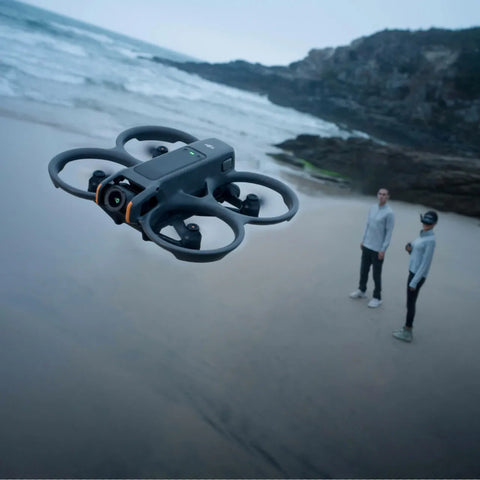
Immersive FPV via motion‑controlled Easy ACRO. Sharp 4K on a 1/1.3‑inch sensor. Propeller guard & Turtle Mode.

  • 4K / 155° Ultra-Wide
  • Easy ACRO
  • O4 Immersive FPVO4 Immersive FPV
  • Built-In Propeller Guard
$409.00

Build Your FPV Kit

1 of 5
1 of 4

Which DJI Avata is right for you?

COMPARE

DJI Avata Series

Two ways to fly. Different perspectives. Same limitless possibilities.

DJI Avata 360 (DJI RC 2)

DJI Avata 360 (DJI RC 2)

$719.00
Learn More
DJI Avata 2 Fly More Combo (Three Batteries)

DJI Avata 2 Fly More Combo (Three Batteries)

$1,019.00
Learn More
Comparison
DJI Avata 360 (DJI RC 2)
DJI Avata 2 Fly More Combo (Three Batteries)
Best For
360° Aerial Creation
Immersive FPV Flight
Video
8K 360°
4K/60fps
View
Capture Now, Frame Later
155° Ultra-Wide FOV
Experience
Creative Freedom
Pure FPV Thrills
Creative Features
360° Reframing & Tracking
Easy ACRO & Motion Control
Flight Safety
Omnidirectional Obstacle Sensing
Integrated Propeller Guard
Ideal For
Creators
FPV Flyers
Core Specifications
Takeoff Weight
Approx. 455 g
Approx. 377 g
Dimensions (L×W×H)
246 × 199 × 55.5 mm
185 × 212 × 64 mm
Aircraft Height
55.5 mm
64 mm
Max Flight Time
Approx. 23 min
Approx. 23 min
Max Takeoff Altitude
4,500 m
5,000 m
Max Horizontal Speed
18 m/s
27 m/s (Manual)
Wind Resistance
10.7 m/s (Level 5)
10.7 m/s (Level 5)
Video Transmission
20 km (FCC)
13 km (FCC)
Internal Storage
42 GB
46 GB
What's Included
DJI Avata 360
x1
-
DJI Avata 360 Intelligent Flight Battery
x1
-
DJI Avata 360 Gimbal Protector
x1
-
DJI Avata 360 Spare Propellers (Pair)
x2
-
Screwdriver
x1
x1
DJI Avata 360 Foldable Landing Pad
x1
-
DJI Avata 360 Lens Cleaning Cloth
x1
-
USB-C to USB-C Data Cable
x1
-
DJI RC 2
x1
-
DJI Avata 360 Charging Hub
-
-
DJI Avata 360 Sling Bag
-
-
DJI RC Motion 3
-
x1
DJI Goggles N3
-
-
DJI RC Motion 3 Lanyard
-
x1
DJI Avata 2
-
x1
DJI Goggles 3
-
x1
DJI Avata 2 Intelligent Flight Battery
-
x3
DJI Avata 2 Two-Way Charging Hub
-
x1
DJI Sling Bag
-
x1
DJI Avata 2 Propellers (Pair)
-
x4
DJI Avata 2 Propeller Screw
-
x16
DJI Avata 2 Gimbal Protector
-
x1
DJI Goggles 3 -2.0D Corrective Lenses (Pair)
-
x1
USB-C OTG Cable
-
x1
Type-C to Type-C PD Cable
-
x1

Customer Reviews

  • I have been flying DJI drones since 2016, Phantoms, Maverics, Avata. Amazing products. And Avata 360 is no exception. Easy to use, great features. Need to add joystick and Goggles later on.
    Well done, DJI!


    Serhiy Lukovenkov
  • So far, after several flights, I'm loving it. I was originally worried about motion sickness with the goggles, but it's been a joy to fly. I'd love to see an enterprise 360 drone hit the market.


    Larry O
  • Awesome drone for first time FPV pilots. Been flying with the motion 3 controller but will switch to the FPV controller after some hours on the sim! Can't wait to go full manual/acro mode.

    Champy Sundara
1 of 3

Frequently Asked Questions

How do the features of DJI Avata 360 differ across various control methods and shooting modes?

Feature availability varies based on your control method and shooting mode.

360° Mode:

8K/60fps HDR video recording, FocusTrack, the 360° Virtual Gimbal, omnidirectional obstacle sensing, and other 360°‑specific features are available only in 360° mode. Some intelligent features vary by control method.

· Only available when using goggles paired with a motion controller: features such as acrobatic maneuvers and Head Tracking.

· Only available when used with a standard remote controller: features such as QuickShots and ActiveTrack 360° in FocusTrack.

Single Lens Mode:

This mode only supports video recording, with a maximum resolution of 4K/60fps. In this mode:

· When used with goggles and motion controller, you can fly and shoot in First-Person View (FPV) for better flat video image quality.

· When used with a standard remote controller, you can also fly and shoot in First-Person View (FPV). The footage tilts with the drone's attitude, giving your footage a dynamic, FPV-style look.

What are the advantages of DJI Avata 360’s native 8K 360° Video?

DJI Avata 360 features two newly designed square CMOS sensors with optimized pixel arrangement, increasing each sensor's vertical pixel count to 4,000, up from 3,000 on traditional rectangular sensors. This enables native 8K (4K+4K) 360° video recording with dual lenses. With large 2.4μm pixels for enhanced light sensitivity and up to 13.5 stops of dynamic range, combined with an f/1.9 aperture, it delivers excellent high dynamic range footage and low-light image quality in both high-contrast scenes and dim environments.

Does DJI Avata 360 support obstacle sensing?

DJI Avata 360 supports omnidirectional obstacle sensing*, and obstacle sensing on the left, right, and rear utilizes the fisheye cameras, so omnidirectional obstacle sensing is only available in 360° mode. In Single Lens mode, only forward obstacle sensing is supported.

* Omnidirectional obstacle sensing is only effective on surfaces with discernible textures and in lighting conditions of 1 lux or greater. Refer to the official DJI product page or the product user manual for details.

Which remote controllers and goggles are compatible with DJI Avata 360?

Standard Remote Controller: DJI RC 2, DJI RC-N2, DJI RC-N3

Motion Controller (requires pairing with DJI Goggles 3 or DJI Goggles N3): DJI RC Motion 3

FPV Remote Controller (requires pairing with DJI Goggles 3 or DJI Goggles N3): DJI FPV Remote Controller 3

Goggles (require pairing with DJI RC Motion 3 or DJI FPV Remote Controller 3): DJI Goggles 3, DJI Goggles N3

Does the max transmission distance of the O4+ video transmission system vary according to the interference level of the environment?

In different environments, the wireless interference level is different, and the max transmission distance will vary.

Unobstructed:

Strong Interference: Urban landscape, approx. 1.5-4 km

Medium Interference: Suburban landscape, approx. 4-10 km

Low Interference: Suburb/Seaside, approx. 10-20 km

Obstructed:

Low Interference and Obstructed by Buildings: approx. 0-0.7 km

Low Interference and Obstructed by Trees: approx. 0.7-4.5 km

Data tested under FCC standard in obstructed or unobstructed environments with typical interference. Used for reference purposes only and provides no guarantee for actual transmission distance.

Compared to other consumer drones from DJI, what sets the DJI Avata 2 apart?

The DJI Avata 2 is an FPV (first-person view) drone that requires a DJI Goggles series product, a DJI RC Motion series product, or a DJI FPV Remote Controller product to operate. This immersive flight experience captures the fun of freely navigating the environment. DJI Avata 2 offers unique camera angles and an enjoyable, playful control experience, unlike other consumer drones.

The unique recording perspective: With its integrated propeller guard designed for safety, DJI Avata 2 can fly in low-altitude, indoor, and wooded areas or even under bridges and get incredibly close to subjects. These images and videos are from unique angles.

Fun control experience: When paired with DJI RC Motion 3, users can quickly learn to fly without complicated and extensive instructions. There is a beginner’s mode to ensure safety and an Easy ACRO function that adds to the flying fun. When used with DJI FPV Controller 3, users can fly in manual mode (M mode), giving them total freedom to soar through the skies.

What advanced controls does DJI Avata 2 support?

It supports M mode (Manual mode)* flying.

* Requires DJI FPV Remote Controller 2 or DJI FPV Remote Controller 3.

Compared to DJI Avata, what improvements have been made in the camera module of DJI Avata 2?

1. The light-sensitive area of the image sensor has been increased, which leads to higher sensitivity and significantly better imaging results, also making it more suitable for low-light shooting.

2. The dynamic range of the image sensor has been improved, making it more suitable for scenes with a high dynamic range.

3. EIS has been enhanced. When used with DJI RC Motion 3, RockSteady is enabled at normal shooting angles and video recording at frame rates up to 60fps, resulting in smoother and more stable footage.

4. It supports a 10-bit D-Log M color profile, providing users with more post-processing and video editing flexibility.

Does the DJI Avata 2 camera support electronic stabilization?

Yes, it offers three selectable modes: RockSteady, HorizonSteady, and Off.

* With stabilization turned off, footage captured with the wide-angle view supports Gyroflow offline stabilization .

The default electronic stabilization mode for Avata 2 out of the box is RockSteady. Users can adjust the settings via the Settings > Camera > EIS in the goggles menu.

Compared to the O3 video transmission of DJI Avata, what are the improvements of the O4 video transmission of DJI Avata 2?

1. It utilizes a new hardware solution. The aircraft antennas have upgraded from two (2T2R) to four (2T4R).

2. It includes a new frequency band, extending the maximum transmission distance of the high-definition live feed to 13 km*, with up to 60 MHz in communication bandwidth.

3. The maximum transmission bitrate has been increased to 60Mbps.

4. When paired with DJI Goggles 3, the latency is as low as 24 ms for 1080p/100fps live feeds and as low as 40 ms for 1080p/60fps live feeds.

Measured in an unobstructed outdoor environment free of interference. The above data shows the farthest communication range for one-way, non-return flights under FCC standards and is for reference only. Always pay attention to RTH reminders on the goggles screen during your flight.

What are the differences between DJI Goggles 2, DJI Goggles Integra, and DJI Goggles 3? What improvements have been made to DJI Goggles 3?

Differences:

DJI Goggles 3 and DJI Goggles 2 are similar in size and screen display performance. However, Goggles 3 exhibits significant enhancements in
video transmission. When paired with Avata 2, they can achieve a minimum transmission latency of 24 milliseconds.

Upgrades:

Compared to DJI Goggles 2 and DJI Goggles Integra, DJI Goggles 3 innovates with an integrated forehead pad design, offering superior comfort. The new Real View PiP feature enhances safety during takeoff and landing.

Does DJI Goggles 3 support real-time video output (livestreaming)?

DJI Goggles 3 supports live feed sharing via Wi-Fi. You can share the live feed to the DJI Fly app over Wi-Fi and enable live streaming within the app.

Some countries and regions prohibit the use of the 5.1GHz or 5.8GHz frequency band, or both. In some countries and regions, the 5.1GHz
frequency is only allowed for indoor use. If the 5.1/5.8GHz frequency band is unavailable (such as in Japan), screen sharing to a smartphone via Wi-Fi is unavailable. To achieve screen sharing, a wired connection is recommended. Before flying, make sure to check and comply with local regulations.